Navigate the player. Adjust the receiver.
In this example, a TV shows the picture, Apple TV handles navigation and playback, and a receiver produces the sound. Your device names can differ; assign each role by what the device actually does.
Before starting, connect Tactra to Home Assistant and confirm that navigation on the player and volume on the receiver work in Home Assistant.
1. Assign the room's devices
Open Settings → Media Systems and add or edit the room. Use these assignments for this example:
| Role | Device | Purpose |
|---|---|---|
| Screen | TV | Screen state and input selection. |
| Remote Target | Apple TV | Directional navigation, select, and back. |
| Audio Target | Receiver | Volume and mute. |
| Playback Target | Apple TV | Play, pause, and supported transport commands. |
Choose the devices from your own Home Assistant instance and save. If you listen through the TV speakers, the TV can also be the Audio Target.
2. Test one role at a time
Select the saved setup and open Remote. Use the touch surface or classic direction pad to move one position in the player menu. Then adjust volume slightly and check the receiver. Start playable content before testing play/pause.
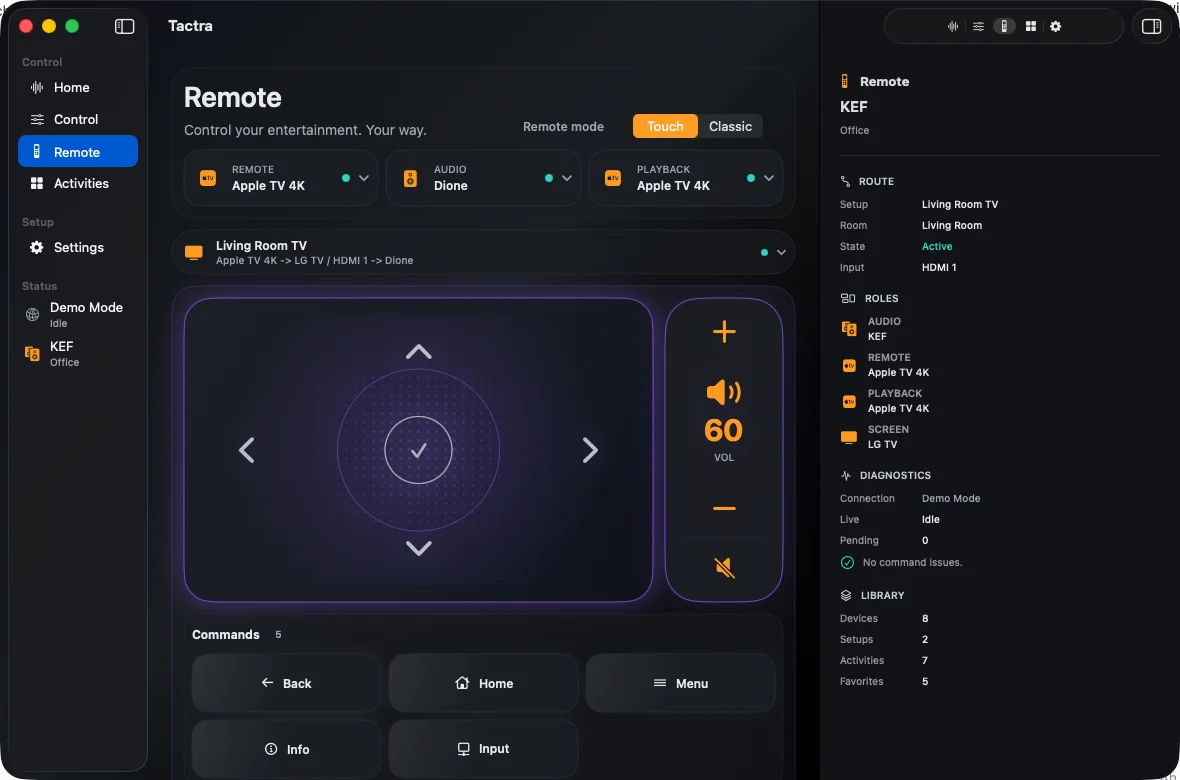
If a command reaches the wrong device, inspect the relevant target and any custom control mapping in Settings. A working volume button does not establish that navigation is configured correctly.
3. Check the input and power behavior
Choose an input exposed by the device responsible for source selection. Test that input in Home Assistant if it does not switch as expected.
For coordinated power, edit the Media System's On and Off actions. Add only actions you have tested. If Home Assistant already has a reliable scene or script for the room, use it. Activities run presets; setup power actions or Home Assistant scripts handle ordered startup sequences.
When navigation is unavailable
Media-player support and remote navigation are different capabilities. Check that the relevant remote entity or supported command route is available in Home Assistant. Confirm the device is awake and the intended setup is selected. Tactra cannot add directional commands to an integration that does not expose a supported route.
For audio-specific problems, continue with receiver volume and inputs. For connection or command errors, use Support.